
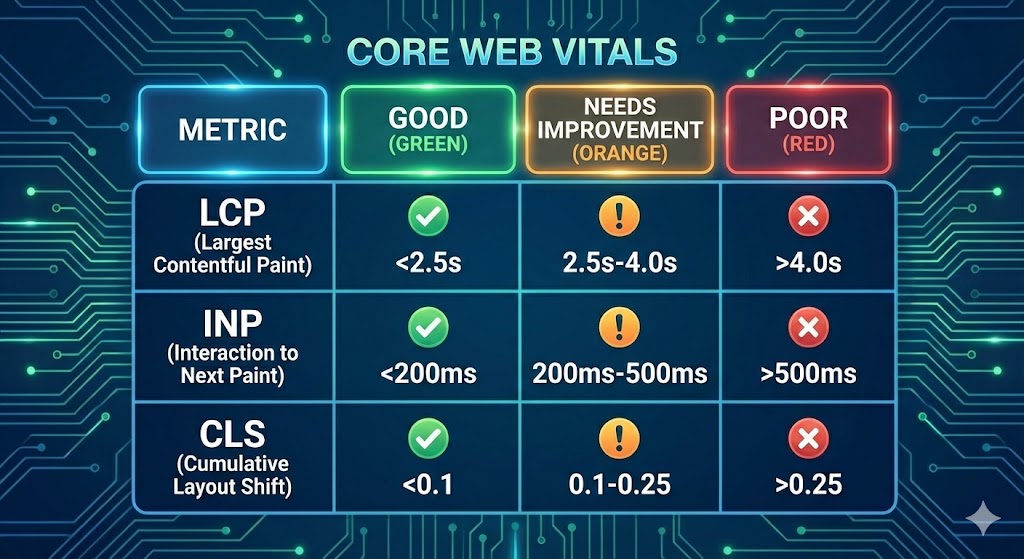
If you care about Google rankings, you know that "speed" is no longer a vague concept. Google has quantified exactly what "fast" looks like through a set of metrics called Core Web Vitals.
For 2025, the landscape has settled into three critical pillars. If you are still reading old guides from 2023, you might be optimizing for the wrong things (specifically, the dead "FID" metric). This guide is your cheat sheet for the current year.
The Three Pillars of Page Experience
Google evaluates your website based on three specific behaviors. You must pass all three to get the ranking boost associated with a good Page Experience.
1. Largest Contentful Paint (LCP): "Load Speed"
The Benchmark: 2.5 seconds or less.
LCP measures perceived load speed. It marks the point in the page load timeline when the main content (usually the hero image or H1 headline) has likely loaded.
- Common Killer: Large, unoptimized hero images.
- The 2025 Fix: Use AVIF format for images and the fetchpriority="high" attribute on your LCP element.
2. Interaction to Next Paint (INP): "Responsiveness"
The Benchmark: 200 milliseconds or less.
Important Update: In 2024, INP officially replaced First Input Delay (FID). While FID only measured the first click, INP measures the latency of every click, tap, and keyboard interaction throughout the user's entire visit.
If a user clicks "Add to Cart" and the screen freezes for half a second because your JavaScript is busy, you fail INP. It exposes the "hidden lag" in heavy sites.
3. Cumulative Layout Shift (CLS): "Visual Stability"
The Benchmark: 0.1 or less.
CLS measures visual stability. Does your content jump around while it loads? If a user tries to click a button and an ad loads above it, pushing the button down, that is a Layout Shift.
- Common Killer: Images or embeds without defined width and height attributes in the HTML.
- The Fix: Always reserve space for dynamic content using CSS aspect ratios.
How to Measure (and Fix) in Django
You cannot improve what you do not measure. Don't rely solely on your own laptop, as you likely have a faster internet connection than your users.
Step 1: The Audit
Use PageSpeed Insights for a quick snapshot, but rely on Google Search Console for the truth. Search Console uses "Field Data" (CrUX), which comes from real Chrome users visiting your site.
Step 2: The Django Optimization Stack
Achieving green scores in Django often requires a specific stack:
- LCP: Use the sorl-thumbnail or easy-thumbnails library to auto-generate WebP/AVIF images at the exact size needed.
- INP: Minimize Client-Side Rendering. Use HTMX to handle interactions server-side, keeping the browser's main thread free from heavy JSON parsing.
- CLS: Hardcode your image dimensions in your Django templates. Example: <img src="..." width="800" height="600">.
Summary
In 2025, Core Web Vitals are not optional. They are the baseline entry fee for ranking on the first page of Google. If your INP is high or your LCP is slow, no amount of keyword stuffing will save you.