
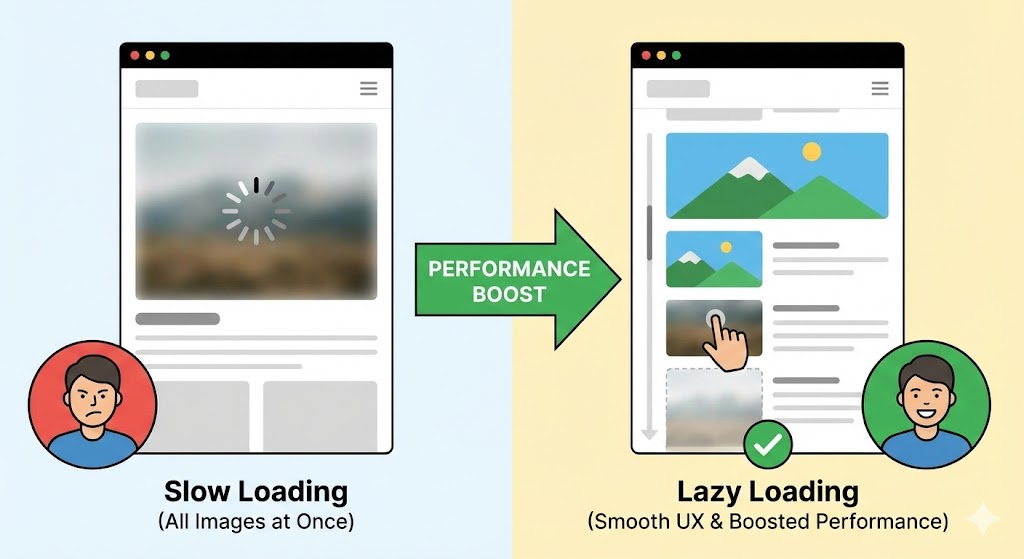
There is a fundamental conflict in modern web design. On one hand, marketing teams want high-resolution photography, rich graphics, and immersive visual storytelling. On the other hand, users want the website to load instantly.
If you load 50 high-quality images the moment a user lands on your homepage, you are forcing their browser to download megabytes of data that they might not even see. The solution to this dilemma is a technique called Lazy Loading.
The "Buffet" Analogy
To understand lazy loading, imagine you are at a buffet.
- Standard Loading (Eager): You pile every single dish available—salad, soup, steak, pasta, and cake—onto your tray at the very beginning. Your tray is heavy, you walk slowly, and the food gets cold before you can eat it.
- Lazy Loading: You take the salad. When you finish, you go back for the steak. When you finish that, you go back for the cake. You only carry what you are currently consuming.
In web terms, "Lazy Loading" tells the browser: "Only download the images that are currently visible on the screen. If the user scrolls down, download the next batch just before they appear."
The Benefit: Speed and Data
The impact of this simple switch is massive:
- Faster Initial Load: Because the browser only has to download the top 10% of the page, the site becomes interactive almost instantly.
- Bandwidth Savings: If a user lands on your blog post but only reads the first paragraph, you don't waste data (and server costs) sending them images at the bottom of the article.
The "Above the Fold" Rule
There is one golden rule when implementing this: Never lazy load the top image.
The image at the very top of your site (the Hero image) is usually the "Largest Contentful Paint" (LCP) element. If you lazy load it, the browser waits too long to show it, hurting your Google Core Web Vitals score. Always "Eager Load" what is visible immediately, and "Lazy Load" everything below the fold.
Native Lazy Loading: No JavaScript Required
In the past, developers needed complex JavaScript libraries to make this work. In 2025, it is built directly into HTML.
You simply add the loading attribute to your image tag:
<!-- Load this immediately (Hero Image) --> <img src="hero.jpg" loading="eager" alt="Main Banner" />

<!-- Load this only when scrolling near it --> <img src="footer-graphic.jpg" loading="lazy" alt="Footer" />
The UX Trap: Cumulative Layout Shift (CLS)
The biggest risk with lazy loading is that it can cause content to jump around. If the browser doesn't know how big the image is before it loads, it will load the text, and then suddenly push the text down when the image snaps in.
To fix this, you must always define dimensions or use aspect-ratio boxes so the browser reserves the empty space.
<img src="photo.jpg" loading="lazy" width="800" height="600" /> Summary
Lazy loading is one of the highest-ROI optimizations you can make. It requires minimal code changes but drastically reduces the weight of your initial page load. It allows you to have your cake (rich visuals) and eat it too (fast performance).