
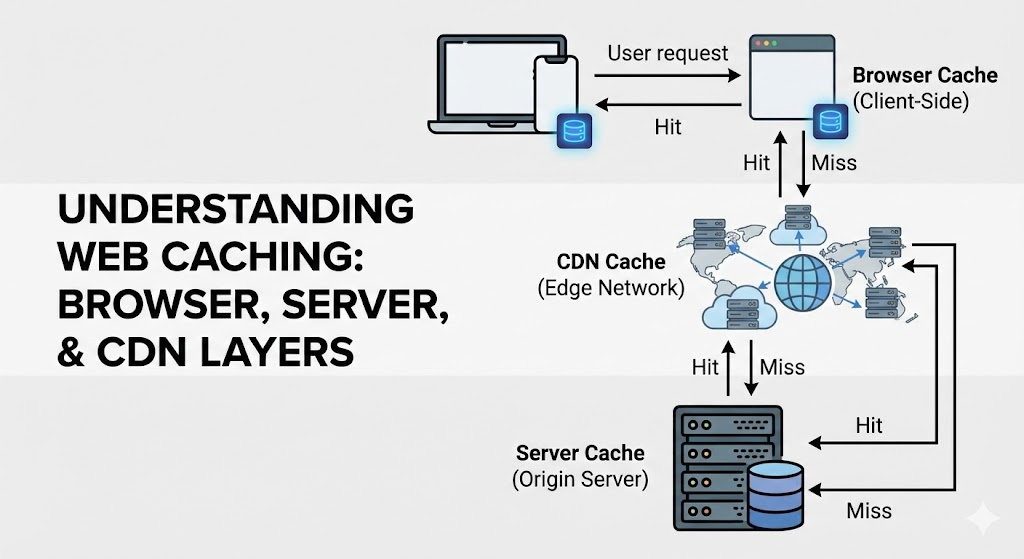
In web development, the fastest network request is the one you never have to make. Every time a user visits your site, their browser has to download code, images, and data. If you force them to download the exact same files every single time they click a link, you are wasting their data and your server resources.
The solution is Caching. Caching is simply the art of saving a copy of a file so you can grab it quickly later. But caching doesn't just happen in one place. It happens in three distinct layers, each serving a different purpose.
To understand these layers, let's use the "Snack Logistics" Analogy.
Layer 1: Browser Caching (The Backpack)
Browser caching happens on the user's actual device (laptop or phone). When they visit your site, their browser downloads your logo, CSS fonts, and banner images. It then stores them in a local "cache" folder on their hard drive.
The Analogy: Imagine you are hungry. The fastest way to eat is to reach into your Backpack. You stored a granola bar there earlier. You don't need to drive to the store; you don't even need to walk to the kitchen. It is right there with you.
- Speed: Instant.
- Control: You control this via "Headers" in your code. You tell the browser, "Keep this logo for 30 days" (Cache-Control: max-age=2592000).
- Risk: If you change your logo, users might still see the old one until their "backpack" cache expires. This is why we use file versioning (e.g., logo-v2.png).
Layer 2: Server-Side Caching (The Kitchen Prep Station)
Sometimes, the data is dynamic—like a list of "Recent Blog Posts" or a user's "Order History." The browser can't cache this forever because it changes. However, calculating this data (querying the database, formatting the HTML) takes time/processing power.
Server-side caching stores the result of these calculations in the server's memory (RAM), usually using a tool like Redis or Memcached.
The Analogy: You are in a restaurant kitchen. Chopping vegetables for every single salad takes forever. Instead, you have a Prep Station where you have already chopped 50 onions. When an order comes in, you grab the pre-chopped onions. You did the hard work once, and now you benefit from it 50 times.
- Django's Role: Django is excellent at this. We can wrap a heavy database query in a cache block. The first user triggers the query; the next 1,000 users get the instant result from Redis.
Layer 3: CDN Caching (The Grocery Store Chain)
We discussed CDNs in a previous post, but in the context of caching, they act as a geographic shield for your main server.
The Analogy: Your main warehouse is in New York. A customer in London wants a snack. Shipping it from New York takes too long. Instead, you ship a pallet of snacks to a Local Grocery Store in London once. Now, all London customers buy from the local store.
- Function: The CDN sits between the user and your server. It caches your static assets (images, JS, CSS) at the "Edge" of the network. The request never even hits your main server.
Comparison at a Glance
| Layer | Location | Best For | Who Controls It? |
|---|---|---|---|
| Browser | User's Device | Static files (Logos, CSS) | User's Browser (guided by your Headers) |
| CDN | Global Edge Servers | Media & Static Assets | You (via Cloudflare/AWS) |
| Server | Your Backend (RAM) | Database Queries, HTML Fragments | You (via Django/Redis) |
Summary
A fast website uses all three layers seamlessly. The browser handles the immediate assets, the CDN handles the geographic delivery, and the server cache handles the heavy computational lifting. If you skip any one of these, you are leaving speed (and money) on the table.