
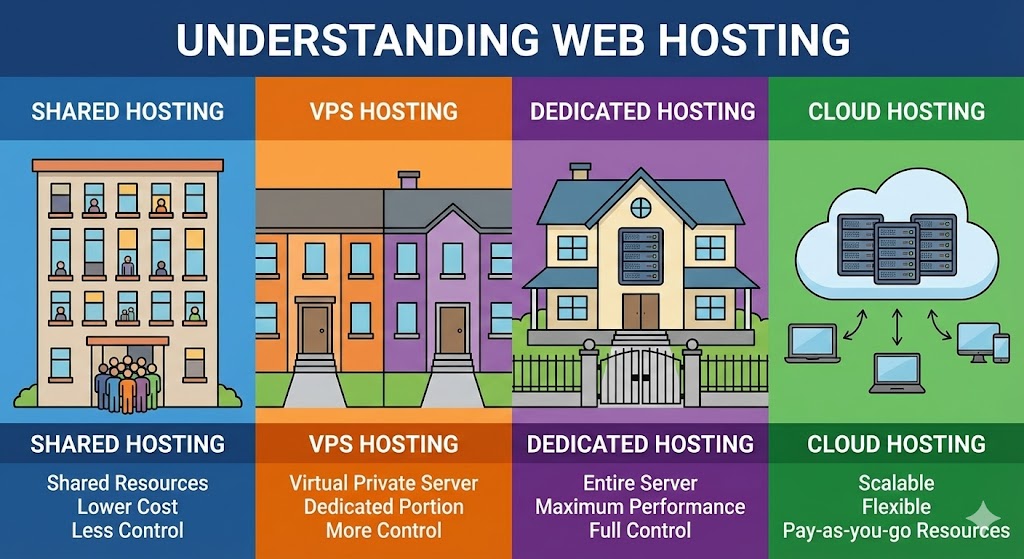
When you are building a new website, one of the first technical hurdles is selecting a hosting plan. You will see terms like "Shared," "VPS," "Dedicated," and "Cloud" thrown around with varying price tags ranging from $5 to $500 a month.
To the non-technical founder, these all sound the same. They all "host" your website, right? While true, the difference in performance and reliability is massive. The easiest way to understand them is to imagine your website is a person looking for a place to live.
1. Shared Hosting: The College Dorm
Shared hosting is the entry-level option. In this scenario, your website lives in a massive dormitory or apartment complex.
- The Setup: You have your own room (directory), but you share the bathroom, kitchen, and living room (CPU, RAM, and Bandwidth) with hundreds of other people (websites).
- The Problem: If your "neighbor" throws a loud party (gets a massive spike in traffic) or clogs the shower (runs a broken script), your experience suffers. You have zero control over who your neighbors are.
- Best For: Hobby blogs, brochure sites with low traffic, and tight budgets.
2. VPS (Virtual Private Server): The Townhouse
A VPS is the sweet spot for most growing businesses. It is still a shared physical building, but it has been divided into private, self-contained units.
- The Setup: You have your own front door, your own kitchen, and your own walls. What your neighbors do doesn't affect you nearly as much. You have a guaranteed amount of resources (RAM/CPU) that belong only to you.
- The Benefit: You get "Root Access," meaning you can paint the walls whatever color you want (install custom software like Redis or Celery).
- Best For: Small to medium businesses, e-commerce stores, and Django applications.
3. Dedicated Server: The Detached Mansion
This is exactly what it sounds like. You rent the entire physical machine.
- The Setup: You own the land and the house. No neighbors. No sharing. You have immense power and storage space.
- The Catch: It is expensive. Also, if the roof leaks (hardware failure), it is your problem to fix—or at least, your problem to wait while the hosting company fixes it manually.
- Best For: Massive enterprise portals, banking apps, or sites with millions of monthly visitors.
4. Cloud Hosting: The Hotel Network
Cloud hosting (like AWS, Google Cloud, or DigitalOcean) breaks the real estate analogy slightly. Instead of renting one specific house, you are tapping into a massive utility grid.
- The Setup: Your site isn't on one single machine. It is floating across a network of hundreds of servers. If one server fails, your site instantly "moves" to another one without going offline.
- The Benefit: Scalability. If you suddenly get 10,000 visitors, you can instantly rent more "rooms" for an hour and then release them when the traffic dies down.
- Best For: Fast-growing startups, SaaS platforms, and apps with unpredictable traffic.
Comparison at a Glance
| Type | Cost | Performance | Control |
|---|---|---|---|
| Shared | $ | Low / Unpredictable | Low |
| VPS | $$ | High / Stable | High |
| Cloud | $$ -$$$ | Variable / Scalable | High |
| Dedicated | $$$$ | Maximum | Total |
Why We Avoid Shared Hosting for Django
As a Django agency, we almost never recommend Shared Hosting. Why?
Django applications often require specific background processes (like Celery for sending emails asynchronously) and specific database configurations (like PostgreSQL). Shared hosting environments are usually locked down to run basic PHP sites (like WordPress) and do not give us the permission to run the modern Python tools that make your site fast and secure.