
Images make up, on average, 60% of the total file size of a web page. If your website is feeling sluggish, the culprit is rarely your code—it is your media library.
For decades, we relied on the holy trinity of image formats: JPEG for photos, PNG for transparent graphics, and GIF for animations. In 2025, using these legacy formats is a strategic error. They are heavy, inefficient, and hurt your Core Web Vitals scores.
The web has moved on to "Next-Gen" formats. But with three major contenders battling for supremacy, which one should your business use? Let’s break down the battle between WebP, AVIF, and the newcomer JPEG XL.
1. WebP: The Reliable Standard
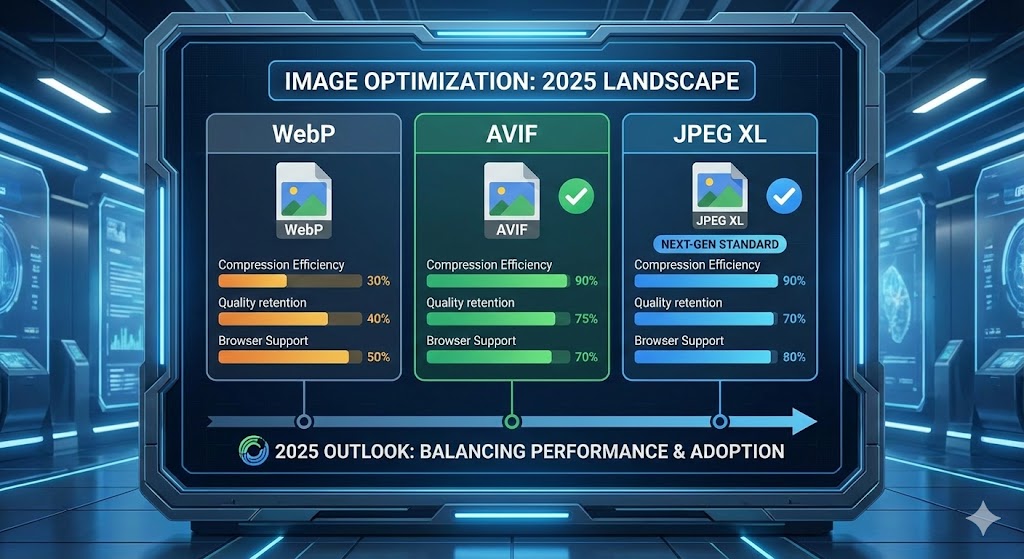
Developed by Google, WebP is no longer "new"—it is the baseline. It was designed to replace both JPEG and PNG. It supports transparency (like PNG) and animations (like GIF) but at file sizes that are 25-35% smaller.
- Pros: Supported by virtually every browser (Chrome, Safari, Firefox, Edge). It is safe, reliable, and easy to generate.
- Cons: It is starting to show its age. Newer formats offer better compression.
- Verdict: The "Safe Bet." If you do nothing else, convert your library to WebP.
2. AVIF: The Compression King
AVIF is derived from the AV1 video codec. Because it uses advanced video compression algorithms, it is incredibly efficient at shrinking file sizes without losing visual quality. It can often compress images 50% smaller than JPEG and 20% smaller than WebP.
- Pros: Unmatched compression for photographs. It creates tiny files that look beautiful.
- Cons: Encoding (creating) an AVIF file takes more server power than WebP.
- Verdict: The "Performance Choice." In 2025, AVIF is the gold standard for high-performance websites.
3. JPEG XL (JXL): The Photographer's Dream
JPEG XL is the most modern of the bunch. It was designed to be the true successor to JPEG. Its superpower is "lossless transcoding," meaning you can convert an old JPEG to JXL, reduce the size by 35%, and lose exactly zero quality.
- Pros: Supports huge dimensions and high dynamic range (HDR). Perfect for complex, high-detail photography.
- Cons: Browser support has been a rollercoaster. While support is growing in 2025, it still lags behind WebP and AVIF in universal adoption.
- Verdict: The "Future-Proof Choice." Great for archiving and high-end portfolios, but requires a fallback strategy.
Comparison at a Glance
| Format | Reduction vs JPEG | Browser Support | Best Use Case |
|---|---|---|---|
| WebP | ~30% | 99% (Universal) | General UI, standard images |
| AVIF | ~50% | 95% (Excellent) | Hero banners, large photos |
| JPEG XL | ~35-60% | Growing | High-res photography, HDR |
How We Handle This in Django
You shouldn't have to manually convert images in Photoshop before uploading them. At our agency, we build Automated Image Pipelines using Django.
When you upload a 5MB PNG to your dashboard:
- Our server accepts the file.
- We automatically generate an AVIF version for modern browsers.
- We generate a WebP version as a backup.
- We use the HTML <picture> tag to serve the best format the user's browser can handle.
This ensures you get the maximum speed of AVIF without breaking the site for users on older devices.
Summary
In 2025, the debate is mostly settled: AVIF is the winner for web delivery, with WebP serving as a robust backup. If you are still serving raw JPEGs, you are paying for bandwidth you don't need and making your users wait for content they want to see.