
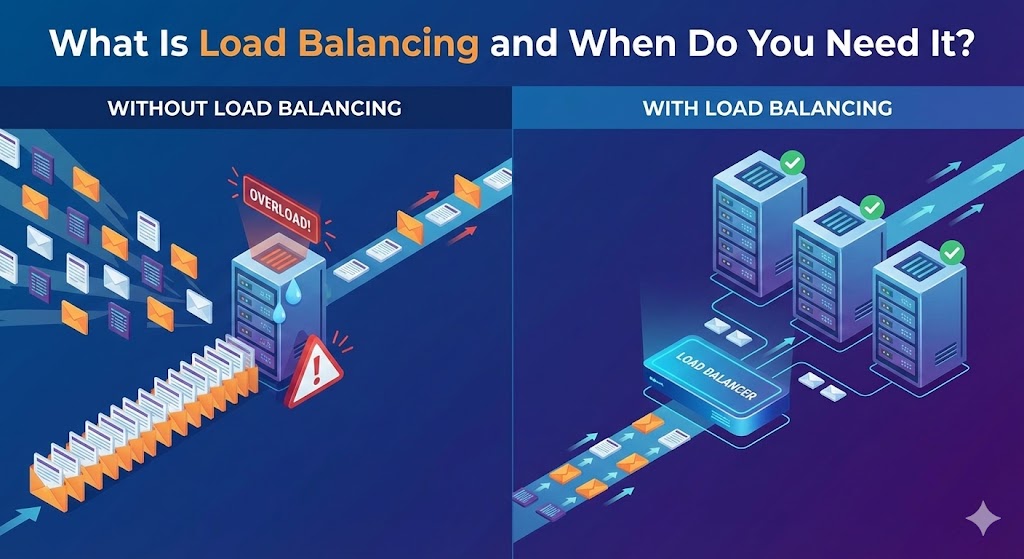
Imagine your business gets featured on a major news site or goes viral on social media. Thousands of visitors flood your website instantly. Ideally, this is a celebration. Realistically, for many businesses, this is a disaster.
Without the right infrastructure, your server gets overwhelmed, the site crashes, and you lose sales. The solution to this bottleneck is a critical piece of technology called a Load Balancer.
The Grocery Store Analogy
To understand load balancing, imagine a grocery store.
- No Load Balancer: There is only one open checkout lane. Even if the cashier is fast (a powerful server), a line of 50 people will result in a long wait. If the cashier gets sick (server crash), the store stops functioning entirely.
- With Load Balancing: You open 5 checkout lanes. A store manager stands at the front. As customers arrive, the manager points them to the shortest line. If Lane 3 closes, the manager stops sending people there and redirects them to Lanes 1, 2, 4, and 5.
In this analogy, your web servers are the checkout lanes, and the Load Balancer is the manager directing traffic.
How It Works Technically
A Load Balancer sits between your users and your backend servers. When a user requests your website (www.yoursite.com), they aren't connecting to the application server directly. They are connecting to the Load Balancer.
The Load Balancer then forwards that request to one of your available servers using an algorithm (usually "Round Robin," where it takes turns: Server A, then Server B, then Server C).
The "Health Check" Superpower
The most important feature of a Load Balancer isn't just distributing traffic; it is resilience. The Load Balancer constantly pings your servers to ask, "Are you alive?"
If Server A fails or crashes, the Load Balancer detects the silence instantly. It removes Server A from the rotation and stops sending traffic there. Your users never see an error page; they are simply routed to the healthy Server B.
When Do You Need One?
Not every website needs a Load Balancer. If you are running a small portfolio or a local business site, a single server is usually sufficient. However, you need one if:
- You Cannot Afford Downtime: If your server crashes at 2 AM, do you want the site to stay down until you wake up? A Load Balancer with multiple servers ensures the site stays up automatically.
- You Are Scaling Horizontally: You have reached the limit of what one single server can handle, and you need to add a second or third server to share the workload.
- You Perform Zero-Downtime Deployments: You want to update your code without kicking users off. A Load Balancer allows you to update Server A while users are on Server B, then switch them over seamlessly.
The Django Context
In the Python/Django world, we often use Nginx or cloud services like AWS Application Load Balancer (ALB). While Django handles the logic, the Load Balancer handles the traffic flow, SSL termination (security), and compression. It is the gatekeeper that allows your Django application to focus on what it does best: processing data.
Summary
Load Balancing is the difference between a fragile website and a resilient platform. It is the insurance policy that ensures your viral moment leads to profit, not a "Server Error" message.